


Snapchat
4.21.78M Reviews
App Specs
- Version
- 14.29.0.50
- Updated On
- License
- Free
- Downloads
- 1,000,000,000+
- Developer
- Snap Inc
- Categories
- Communication
- Platform
- Android, iOS
Screenshots




 Analysis by AppCompare
My first week with Snapchat made the appeal easy to understand: it turns ordinary exchanges into quick, visual moments. A photo, a short video, a playful lens, or a reply to a friend’s story can feel more natural than composing a polished post. That low-pressure style is the app’s best opening move, especially if the people you want to talk to already use it.
Why the first week feels lively
The camera-first approach gives Snapchat a different rhythm from a conventional messaging inbox. You can capture something as it happens and send it directly, rather than deciding whether it deserves a permanent place on a profile. In practice, that makes small things—a funny expression, a meal that went wrong, a view on the way home—feel like reasonable messages instead of content that needs editing and context.
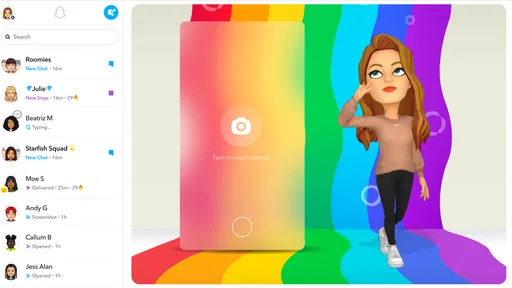
Lenses and filters help make those exchanges personal, but they work best as an occasional bit of fun. I would not choose the app just for face effects; their appeal can wear thin once the novelty passes. The more lasting benefit is that a visual reply can carry a tone that a plain text message might miss. Bitmoji adds another playful option for people who enjoy having a cartoon version of themselves in conversations, though it is not essential to getting value from the app.
Guides and Analysis on Snapchat
One useful habit is to decide who you actually want to hear from before adding lots of people. A smaller circle makes stories easier to follow and helps keep the app feeling like communication rather than a stream of strangers’ updates. If you are new, start with a few friends, try sending a direct snap, and see whether that style fits how you already talk.
What keeps it useful month to month
Snapchat is a communication app from Snap Inc, and its ongoing value depends less on a novelty effect than on whether your friends use it. If your group shares quick visual updates there, the app can become a convenient side channel for casual check-ins. If everyone you care about prefers another messenger, there is little reason to maintain a second inbox just because its camera is entertaining.
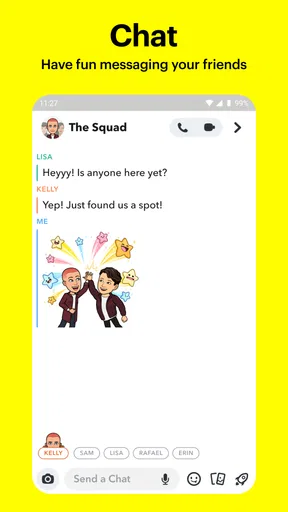
A realistic everyday use is coordinating an informal meet-up. One friend can send a quick view of the café entrance, another can reply with a short clip from the bus, and the group can settle the plan without turning it into a public post. Stories are useful for a broader, low-effort update; a direct message is better when a reply matters or the moment is meant for one person. Choosing between those two routes is a small but important way to keep sharing comfortable.
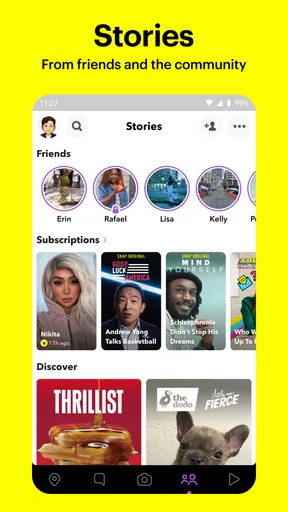
Stories also offer a faster way to catch up than scrolling through a long sequence of conventional posts. That suits people who want brief glimpses of friends’ days, not a carefully maintained public feed. Discover adds a separate stream of publisher, creator, and news content, but I would treat it as optional browsing rather than the main reason to install the app. If you open Snapchat to message someone, it helps to keep that purpose in mind rather than letting every content surface become another thing to check.
Worth Reading Before You Choose

Switching to Android Auto Means Rethinking Your Driving Routine

Google Calendar Makes a Crowded Week Easier to Manage

Ludo King Makes the Most of the Minutes Between Plans

Baby Panda World Brings Quick Play to Modern Phones, but Its Game Library Feels Busy

ESPN’s Live Game View Makes Following Close Games Easier

QuizzLand Review: A Good Fit for Short Trivia Breaks, Not Every Player
Privacy, expectations, and everyday care
The disappearing-message format can make sharing feel less formal, but it should not be mistaken for a guarantee that a recipient cannot keep or share what they see. I use it for ordinary, low-stakes moments, not for passwords, financial details, or anything that would cause real harm if it escaped the conversation. A message that vanishes from the app can still be captured or remembered, so the sensible rule is to send only what you would be comfortable showing that person.
Audience controls matter just as much as the disappearing format. Before posting a story, I would check who can see it and whether the intended audience is a friend list or a wider group. If someone makes an interaction uncomfortable, blocking or reporting is more useful than hoping the issue will fade on its own. These controls give you ways to manage your space, but they still require attention; privacy is partly a matter of choosing the audience carefully each time.
For people who are deciding whether the app is suitable for a younger teen, the Teen age rating is a useful starting point, not a substitute for family judgment. I would talk through who can contact them, what they are comfortable sharing, and how they should respond to unwanted messages. The app is rated for teens, but no age label can make every conversation or piece of content right for every young person.
The upkeep and the parts that can become tiring
Keeping Snapchat worthwhile takes a modest amount of attention: manage your contacts, review story audiences, and decide whether you want to spend time in Discover as well as in chats. That is not difficult, but it can become maintenance if you follow many people or feel obliged to respond to every update. A practical approach is to keep notifications and social expectations in check, and to open the app when you have a person or purpose in mind rather than out of habit.
The same immediacy that makes the app lively can also create fatigue. Frequent stories may make you feel that you are supposed to keep up with everyone, while lenses can nudge a simple conversation toward performing for the camera. If you prefer a quiet inbox, long-form messages, or a stable archive you can search later, this may not be the best place for your main conversations. A more conventional messenger is often the better choice when reliability, text-first communication, or keeping a record matters more than visual spontaneity.
Compared with familiar messaging apps, Snapchat’s clearest distinction is its camera-led, temporary style and its mix of private chats with stories and Discover. That combination is a strength if your friends already share moments there and you enjoy quick visual exchanges. It is a drawback if you want one uncluttered place for practical coordination, persistent message history, and conversations that do not revolve around photos or clips. I would not replace a dependable group chat with it unless the people in that group are willing to make the switch too.
One small workflow helps keep the app from taking over: use a direct snap for a moment that invites a personal reply, and use a story only when you genuinely want several people to see it. Before sharing something sensitive, consider whether the recipient needs it at all and whether another channel would be more appropriate. These choices reduce accidental oversharing and make the different parts of the app feel less interchangeable.
Who should keep it—and who can skip it
I would recommend Snapchat to people whose friends already use it, who like communicating through photos and short videos, and who want casual exchanges to feel less like a permanent social post. It can also suit someone who enjoys lenses and Bitmoji but does not need every conversation to be serious or text-heavy. The app is free to download, though it includes in-app purchases; I would treat those as optional rather than assume they are needed for basic communication.
I would skip it if your social circle is elsewhere, if temporary messages make you less comfortable rather than more relaxed, or if you are trying to reduce the number of feeds competing for your attention. It is also a poor fit for anyone who expects disappearing content to function as secure storage or wants every useful conversation preserved in a tidy, searchable record. In those cases, a standard messaging app—or simply staying with the service your contacts already check—is the more practical choice.
How it holds up after the novelty fades
Snapchat has been available since October 29, 2012, and its scale is substantial: it has over one billion installs, around 39 million ratings, and an average rating of 4.2. Those figures suggest that many people find a reason to return, but popularity alone does not make it essential for every user. For me, its lasting value comes from a real social circle using it for lightweight, visual conversation; without that, the camera tricks and content feeds are not enough to justify another daily habit.
The current version is 13.95.0.44, and the app supports Android 6.0 and later. I would still judge it by fit rather than by version details: try it with the friends you actually want to reach, decide whether stories help you keep in touch, and notice whether opening it feels useful or compulsory. That is a better test than spending the first evening trying every effect.
The Magic of Ephemeral Messaging
So, one of the coolest things about Snapchat is its ephemeral messaging feature. Basically, you send a photo or a video, and it disappears after the recipient views it. This is perfect for those "in-the-moment" kinds of conversations. No more worrying about your messages being stored forever! It's kinda like having a face-to-face chat, but through your phone.
Filters, Lenses, and More Fun Stuff
Now, let's talk about those crazy-awesome filters and lenses. Honestly, I could spend hours transforming my face into a puppy or trying on a virtual crown. It's not just fun for you, but it also makes your snaps more entertaining for your friends. Plus, Snapchat keeps things fresh by regularly updating their filter options, so there's always something new to try.
And don't even get me started on the Bitmoji integration. It's like having a little cartoon version of yourself that can express exactly how you're feeling. Trust me, it adds a whole new layer to your conversations.
Discover and Stay Updated
If you're into staying in the loop with the latest news and trends, Snapchat's Discover feature is where it's at. You can watch stories from your favorite brands, influencers, and even catch up on news. It's like having a mini magazine on your phone, and you can tailor it to show content that you're genuinely interested in.
Plus, the stories from your friends are a great way to keep up with what everyone is doing. You get quick snapshots of their day without having to scroll through endless posts. It's efficient and engaging at the same time.
Privacy and Control
Privacy is a big deal these days, and Snapchat takes it seriously. You have control over who sees your snaps and stories, and you can always block or report users if things get weird. It's comforting to know that you have the power to manage your own space within the app.
Also, those disappearing messages? They add an extra layer of privacy, so you can share your thoughts without them haunting you later.
Is it right for you?
So, is Snapchat worth a try? If you love staying connected in a fun, dynamic, and private way, I'd say go for it. Whether you're a fan of quirky filters, quick chats, or staying updated with the latest trends, this app has something for everyone. Plus, it's a great way to keep things light and playful in your digital interactions. So why not give it a whirl?
Ready to snap your way into a new kind of communication? You can download it from the App Store or Google Play and see for yourself what the buzz is all about!
Pros
- Fun and creative filters enhance photos.
- Quick and easy sharing with friends.
- Short-lived messages enhance privacy.
- Discover feature offers diverse content.
- Engaging AR features for interactive fun.
Cons
- Battery consumption can be high.
- Limited editing tools for videos.
- Complex privacy settings for new users.
- Occasional app crashes reported.
- Ads can be intrusive at times.
FAQs for Snapchat
What are the main features of Snapchat?
Snapchat is a multimedia messaging app known for its iconic disappearing messages. Users can send photos and videos, called "Snaps," which vanish after being viewed. It also offers Stories, a collection of Snaps viewable for 24 hours, and various creative tools like filters, lenses, and Bitmoji integration. Additionally, Snapchat has a Discover section for news and entertainment.
How does Snapchat ensure user privacy?
Snapchat prioritizes privacy by automatically deleting Snaps after they are viewed. However, users should be aware that recipients can take screenshots, potentially saving content. The app also provides privacy settings to control who can view your Snaps and Stories. End-to-end encryption is used for messages, enhancing security for communications.
Is Snapchat safe for teenagers to use?
Snapchat is generally safe for teenagers with proper guidance. It includes features like Snap Map and Discover, which may expose users to external content. Parents should discuss online safety and privacy with their teens. Snapchat also offers parental controls and privacy settings to help manage who can contact the user and view their content.
Can I recover deleted Snaps or messages?
Once a Snap is viewed, it is automatically deleted from the recipient’s device. Snapchat servers are designed to delete unopened Snaps after 30 days and unopened Snaps in group chats after 24 hours. There is no official way to recover deleted Snaps or messages, reinforcing the app’s focus on ephemeral content.
Are there any costs associated with using Snapchat?
Snapchat is free to download and use. However, it offers optional in-app purchases for additional features, such as customizing Bitmoji or buying extra Replays. The app may also contain ads, which contribute to its revenue. Users can enjoy the core functionalities without any cost but should be aware of these optional purchases.


